
Easy Video Cutter” is a name used by several different software tools across desktop (Windows), mobile (Android/iOS), and online platforms, all designed to offer simple, fast, and intuitive video trimming and basic editing for users without professional video production experience.
The primary function, regardless of the specific version, is to allow a user to cut a part of a video file—either by trimming unwanted segments from the beginning or end, or by splitting the video and removing a section from the middle. These tools prioritize ease of use, typically featuring a straightforward interface where users can select the start and end points of the desired clip using slider markers on a timeline.
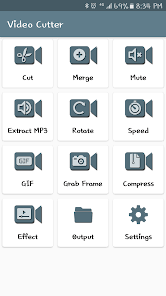
The capabilities often extend beyond just cutting. Most versions also support key functions like merging or joining multiple video clips into one continuous file, extracting the audio stream (often to an MP3 file), and performing basic video manipulations such as rotating the video orientation or adjusting the playback speed for slow-motion or fast-motion effects.
Many applications bearing this name or similar ones, like “Free Video Cutter,” boast support for a wide range of video file formats (including MP4, MOV, AVI, WMV, etc.) and aim to preserve the original video quality, sometimes by utilizing a High Speed Mode that avoids re-rendering the untouched portions of the video. Furthermore, many contemporary “Easy Video Cutter” type tools are offered as free or freemium services, often serving as quick, no-install online web applications or simple mobile apps for content creators on the go, making them popular for generating short clips for social media platforms like TikTok, Instagram, and YouTube
About the Author